The Accounts and Files to Save Before Student Access Ends
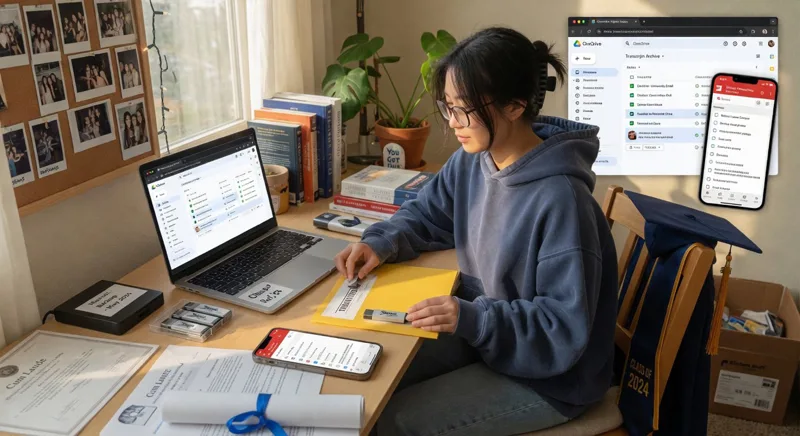
When graduation, withdrawal, or a school account change is approaching, a little preparation can prevent a major headache. This guide to the accounts and files to save before student access ends covers documents, email, cloud storage, software licenses, subscriptions, and personal data you may otherwise lose.
Why Student Account Access Can Disappear
Schools commonly suspend or delete student accounts after graduation, enrollment changes, or a period of inactivity. Your institution controls the timing and retention policy, so never assume that a school email account, Google Drive, OneDrive, or Microsoft 365 files will remain available indefinitely.
Google states that education organizations manage account suspension, data retention, and deletion. Export and content-transfer options may also depend on administrator settings.[1] Microsoft notes that reclaiming a student license can remove access to Exchange Online, OneDrive, and other Microsoft 365 services, with mailbox data potentially deleted after a grace period.[4]
Check your school’s IT, registrar, or student technology page for the exact account expiration date. If no date is listed, contact support before your final semester ends.
Files to Download or Transfer First
Academic Work and Portfolios
Save work that could support future employment, graduate school applications, professional certification, or personal projects. Consider downloading:
- Research papers, essays, lab reports, presentations, and design projects
- Capstone projects, theses, dissertations, and supporting research
- Class notes, study guides, reading lists, and approved reference materials
- Code repositories, datasets, spreadsheets, and technical documentation
- Internship evaluations, recommendation letters, and project feedback
- Certificates, awards, transcripts, and academic achievement records
Use widely supported formats whenever possible. Save editable documents in formats such as DOCX, XLSX, PPTX, or PDF, and keep the original project files when they contain valuable formatting, formulas, layers, or source code.
Cloud Storage and Shared Documents
Review every school-managed storage service, including Google Drive, OneDrive, SharePoint, Dropbox Education, Canvas, Blackboard, and other learning management systems. Files owned by a teacher, department, or group may not transfer automatically, while files shared with you may disappear when the owner’s permissions change.
Create a simple folder structure on a personal drive or external storage:
- Academic records
- Coursework by semester
- Career and portfolio materials
- Research and data
- Personal documents
- Photos and media
After transferring files, open a sample from each folder to confirm that the download worked. Check file names, formatting, embedded images, formulas, hyperlinks, and permissions.
Accounts to Review Before Graduation
School Email
Search your student inbox for messages you may need later, including internship correspondence, employment contacts, housing records, financial aid notices, appointment confirmations, and professional introductions. Forward personal messages to a private email address only when permitted, and avoid transferring confidential student records or other people’s private information.
Update important accounts that use your school email for login or password recovery. Common examples include:
- Job boards and professional networking profiles
- Banking, budgeting, and payment services
- Healthcare and pharmacy portals
- Travel, rental, and utility accounts
- Software, domain, hosting, and developer accounts
- Professional associations and certification platforms
Software Licenses and Student Discounts
Student access may include Microsoft 365, Adobe Creative Cloud, statistical software, engineering tools, cloud computing credits, antivirus software, and other education licenses. Identify which products are linked to your institution and determine what happens when the license expires.
Before access ends, export projects from proprietary applications and save them in a usable format. For example, preserve both an editable design file and a PDF preview, or both source code and a compiled version. Do not assume that an installed application will continue working after the school license is removed.
Learning Platforms and Professional Profiles
Download completion certificates, course histories, instructor feedback, and portfolio links from systems such as Canvas, Blackboard, Moodle, Coursera for Campus, or department-specific portals. If a profile or portfolio URL includes your university identity, update it before the account closes.
Personal Data and Privacy Checks
Separate personal material from school property. Remove private photos, saved passwords, tax documents, health information, and personal communications from school-managed devices or accounts. At the same time, do not copy restricted course materials, copyrighted textbooks, examination content, research data, or confidential records without permission.
Education privacy laws can limit how schools disclose personally identifiable information from education records, but those rules do not guarantee permanent access to every file in a student account.[2][3] Save your own records lawfully and follow your institution’s policies.
A Practical Final-Week Checklist
- Confirm the exact account closure or license expiration date.
- Export files from Google Drive, OneDrive, email, and learning platforms.
- Transfer important documents to storage you control.
- Open transferred files and verify that they work.
- Update personal email addresses and recovery methods.
- Download transcripts, certificates, and academic records.
- Review software licenses, subscriptions, and student discounts.
- Remove personal data from school devices and browsers.
- Ask IT whether shared files, email archives, or mailbox data have a grace period.
- Keep at least two secure copies of irreplaceable files.
Final Takeaway
The best time to save your accounts and files is before your final exam, not after access has already ended. Prioritize email, cloud storage, academic work, transcripts, software projects, and password recovery details. A careful transfer and verification process can preserve years of study, simplify your next career step, and prevent the stress of trying to recover data after a school account is closed.
References
You May Also Like
 Careers
What No One Explains About the First Year of Work
 Careers
Understanding Employee Benefits for the First Time
 Real Estate
Your First Apartment Checklist After Graduation